.png?width=1459&height=292&name=__DetechtionAi_slategrey-red_TRANSPARENT%20(1).png)
Overview
If you've forgotten your Detechtion dashboard password, you can reset it using the 'Forgot Password' option on the login page. A password reset email will be sent to the email address associated with your account.
Before You Begin, You Will Need:
- Access to the email address associated with your Detechtion account
- An internet connection
- Access to your email inbox (including your Spam or Junk folder)
Reset Your Password
- Navigate to the Detechtion login page.
- Select 'Forgot Password'.
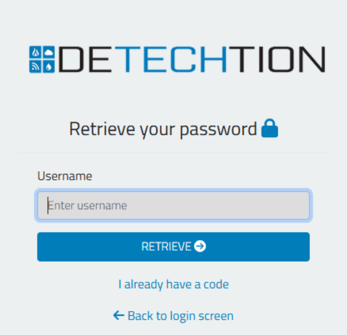
- Enter the username associated with your account.
- Select Submit.
- Check your email for the password reset message.
- If you do not see the email, check your Spam or Junk folder.
- Open the password reset email.
- Follow the prompts to create a new password.
- Return to the login page and sign in using your new password.
Didn't Receive the Password Reset Email?
- Verify you entered the correct email address.
- Check your Spam or Junk folder.
- Wait a few minutes and try again.
- If you still do not receive the email, please contact Support.
Still Unable to Log In?
If you successfully reset your password but still cannot log in, your issue may be related to:
- Multi-Factor Authentication (MFA)
- Account access
- User permissions
Please see the related articles below.
Contact Support
If you're still unable to access your account after following these steps, please provide:
- First Name
- Last Name
- Company Name
- Product (Enbase, Enalysis, EZOps, etc.)
- Email Address
- Description of the issue
This information helps us verify your account and resolve your issue more quickly.
Contact Us - Support Information
Existing Customers
Compression Support
- Enbase — Email: enbasesupport@detechtion.com | Phone: 713-492-0008 (ext 2)
- Enbase Panel — Email: panelsupport@detechtion.com | Phone: 713-492-0008 (ext 4)
OneView Compression
- OneView Compression — Email: oneviewsupport@detechtion.com | Phone: 713-492-0008 (ext 2)
Enalysis Support
- Email: erc@detechtion.com | Phone: 403-250-9220
Fieldlink Support
- Email: fieldlinksupport@detechtion.com | Phone: 713-492-0008 (ext 3)
EZOps Support
- Email: ezopssupport@detechtion.com
- Phone: 1-587-841-5878
Payload
- Phone: 1-800-516-7647
Prospective Customers
Sales Team
- Email: info@detechtion.com
General
- Support: support@detechtion.com
- General Information: info@detechtion.com